TL;DR Use my custom script to generate the model configurations for your local LLM. Found here.
One challenge when self-hosting LLMs and working with OpenCode is that OpenCode must be manually configured to work with your models. Unlike its built-in providers, there is no way to set a custom URL to have models automatically loaded. This is a disappointing limitation that has been raised many times in their GitHub issues. ( 1 2 3 4 5 6 7 8 )
Existing guides for getting local LLMs to work suggest setting the models up in your opencode.json file (found in ~/.config/opencode/opencode.json) manually. This can be difficult, considering that many models can be hosted and they may have various unique names or configurations.
I wrote a script to automate this, but to use it, you must first set up an ID to be used as your provider.
Add the Custom Provider In OpenCode
- In OpenCode, use the command:
/connect - Filter the list down to
Other Custom Providers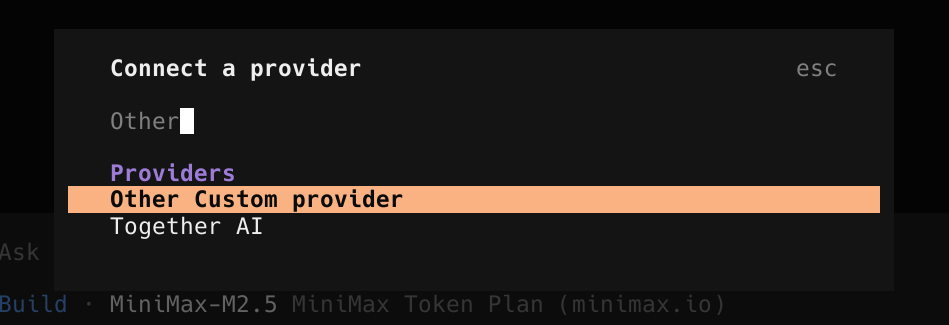
- Set a custom ID, which will be used later in the configuration.
- Set any API key. (By default, Ollama and Llama.cpp do not require API keys and will accept any value.)
- This new provider will show up in your auth file (found at:
~/.local/share/opencode/auth.json)
Next Generate the Models
Unfortunately, OpenCode does not allow models to be dynamically loaded via a custom OpenAPI endpoint. Because of this, you have to manually write out the models yourself. The configuration should look like this:
{
  "$schema": "https://opencode.ai/config.json",
  "provider": {
    "llama_cpp": {
      "npm": "@ai-sdk/anthropic",
      "name": "llama_cpp",
      "options": {
        "baseURL": "http://localhost:11434/v1",
        "apiKey": "local"
      },
      "models": {
        "deepseek-14b": {
          "name": "deepseek-14b",
          "limit": {
            "context": 32768,
            "output": 8192
          }
        }
      }
    }
  }
}
I wrote a quick utility that pulls your models and generates a configuration for your opencode.json file. You can find it here: GitHub: monksy/opencodemodels-llama
Assuming your local LLM is hosted at http://127.0.0.1:11434/v1 (the Ollama default), you can use the following command:
./opencodemodels-llama.sh
If your endpoint is located elsewhere, checkout the README in the repository for the options the script provides.
The output will be a JSON object of models to replace your models key in provider.[providerid].models. If you don’t already have a provider.[provider] section, use the example above to add it to your configuration.
Viewing The Models in OpenCode
You should now see your models under llama_cpp/[models] (if you used llama_cpp as your provider ID). Use the /models command to bring up the dialog box and view all available models.